LATEX-to-Word
 GrindEQ LaTeX-to-Word converts LaTeX, AMS-LaTeX, Plain TeX, or AMS-TeX documents to Microsoft Word format. Works with Microsoft Word for Windows, 32-bit and 64-bit compatible.
Convert your TeX and LaTeX documents to Microsoft Word;
Choose either Microsoft Equation, Equation Editor 3.x, or MathType format for converted equations;
BibTeX emulator is included;
Convert tables, lists, etc.;
LaTeX cross-referencing and Microsoft Word cross-referencing fields are supported;
Adjust font and styles;
Import images, including PostScript;
ANSI, OEM, MAC, Unicode, and UTF-8 encoding are supported;
Convert a whole LaTeX document or a selected part.
LaTeX-to-Word in 3 steps
Step 1
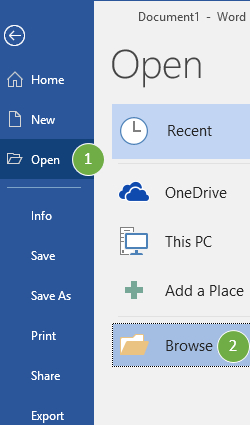
Open your LaTeX document (*.tex) in Microsoft Word:
on the File tab, click Open  and then click Browse
in the type list, click LaTeX [GrindEQ] (*.tex) 
and Open the document.
![Open type: LaTeX [GrindEQ] (*.tex)](img/l2w/step1b.jpg)
Step 2
Update cross-references if needed:
press  Update button, or select Update command.
Step 3
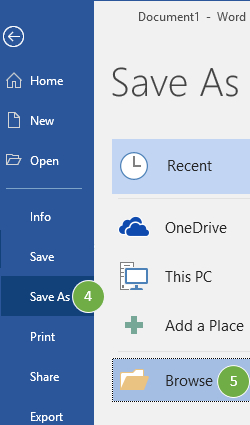
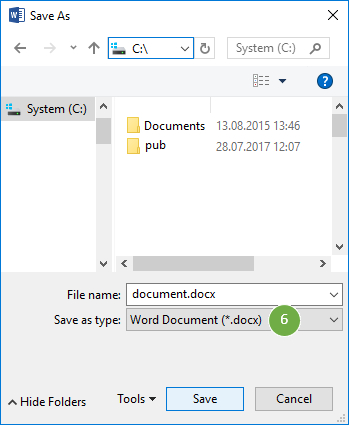
Save the converted document as Word Document using standard Save As menu:
on the File tab, click Save As  and then click Browse
in the Save as type list, click Word Document (*.docx) 
and Save the document.
GrindEQ Math ribbon Depending on Microsoft Word settings, GrindEQ Math will appear in the Microsoft Word Ribbon. Just select a part of your document you want to convert and press the appropriate GrindEQ button. | 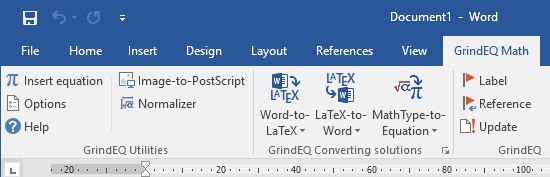 |
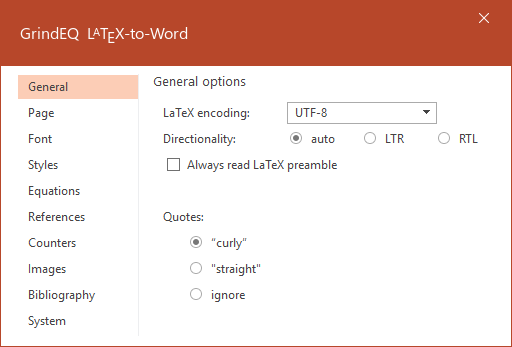 | LaTeX-to-Word Options Options are accessed by pressing and holding Ctrl while launching LaTeX-to-Word, or via GrindEQ Math | Options from Microsoft Word menu, or choose GrindEQ Options from the Windows Start menu. |
 |  |  |
| ||
 | |  |
| ||
 |  |  |
Copyright © 2026 GrindEQ. All rights reserved.
1EQUATION OÜ•SEPAPAJA 6, 15551 TALLINN, ESTONIA


