Word-to-LATEX
 GrindEQ Word-to-LaTeX converts Microsoft Word documents to LaTeX, AMS-LaTeX, Plain TeX, or AMS-TeX format. Works with Microsoft Word for Windows, 32-bit and 64-bit compatible.
Convert your Microsoft Word documents to LaTeX or TeX;
Convert equations (Microsoft Equation, Equation Editor 3.x, and MathType) in editable form;
Prepare equations for publication on the Internet using the optional MathJax compatibility mode;
Edit article and book styles;
Edit LaTeX preamble if needed;
Convert tables, lists, headers/footers, cross-references, etc.;
Export images in PS/EPS/PNG/JPEG format;
ANSI, OEM, MAC, Unicode, and UTF-8 encoding are supported;
Convert a whole Microsoft Word document or a selected part.
Word-to-LaTeX in 4 steps
Step 1
Open your document (*.docx, *.doc, *.rtf, etc.) in Microsoft Word.
Step 2
Save your document as LaTeX [GrindEQ] using standard Save As menu:
on the File tab, click Save As  and then click Browse
in the Save as type list, click LaTeX [GrindEQ] (*.tex) 
and Save the document.
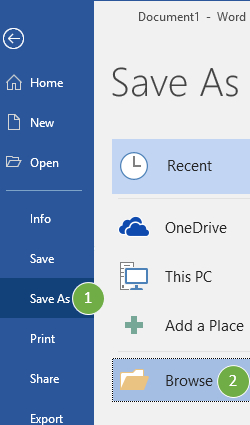
![Save as type: LaTeX [GrindEQ] (*.tex)](img/w2l/step2b.jpg)
Step 3
Close Microsoft Word.
Step 4
Open the converted LaTeX document in your favorite editor (Microsoft Notepad or another text editor can be used).
GrindEQ Math ribbon Depending on Microsoft Word settings, GrindEQ Math will appear in the Microsoft Word Ribbon. Just select a part of your document you want to convert and press the appropriate GrindEQ button. | 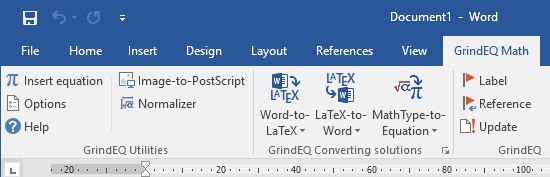 |
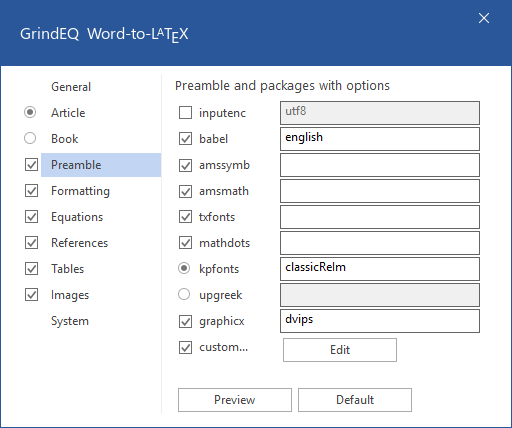 | Word-to-LaTeX Options Options are accessed by pressing and holding Ctrl while launching Word-to-LaTeX, or via GrindEQ Math | Options from Microsoft Word menu, or choose GrindEQ Options from the Windows Start menu. |
 |  |  |
| ||
|  |  |
| ||
 |  |  |
Copyright © 2026 GrindEQ. All rights reserved.
1EQUATION OÜ•SEPAPAJA 6, 15551 TALLINN, ESTONIA


