Download
Download Universal Installer (Supports both 32-bit and 64-bit Windows)
DOWNLOAD GrindEQ Math Utilities 2026
Trouble downloading? Try this alternative ZIP link: GrindEQ_Math_Utilities_2026.zip
 Note on Security
Some antivirus programs may trigger a "false positive" alert for specialized math utilities. Please rest assured that GrindEQ is digitally signed and 100% safe to install.
 How to complete your download
In Google Chrome: If you see a "File is not commonly downloaded" warning, click the arrow or three dots next to the file and select "Keep."
In Windows Defender: If a blue "Windows protected your PC" window appears, click "More info" and then select "Run anyway."
Get Your License Key
Try Before You Buy
Installation
You must have the Administrative Rights on your computer: right click on the executable file and select Run as administrator.
Select modules you want to install. You will be able to install other modules later.
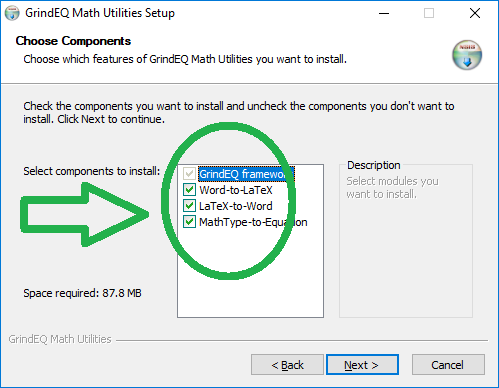
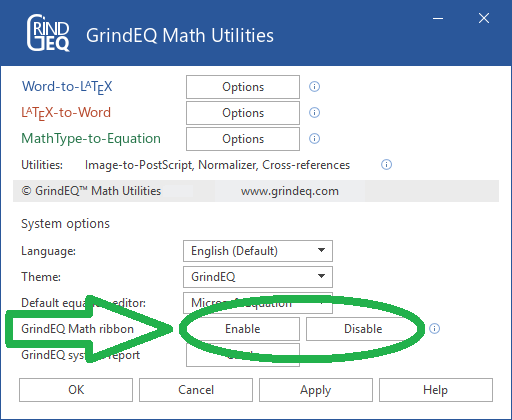
After the installation of GrindEQ Math Utilities is complete, choose the GrindEQ Options from the Windows Start menu. And then enable (or disable) optional GrindEQ Math ribbon, which will be integrated into Microsoft Word.
Note, the GrindEQ Math ribbon contains macros. If your antivirus does not allow macros, use standard dialogs:
Save As ... LaTeX [GrindEQ]
Open ... LaTeX [GrindEQ]
Save As ... Microsoft Equation [GrindEQ]
Languages & Themes
Currently national languages are being prepared for downloading. Everyone is welcome to supply own languages and themes, please visit Languages and Themes Specifications.
Please contact support@grindeq.com for collaboration details.